Azure IoT Hub Producer
The Azure IoT Hub Producer destination writes data to Microsoft Azure IoT Hub. To write to Microsoft Azure Data Lake Store, use the Azure Data Lake Store destination. To write to Microsoft Azure Event Hub, use the Azure Event Hub Producer destination.
Use the Azure IoT Hub Producer destination in a pipeline when you want to send device data - such as temperature or sensor data - to Azure IoT Hub after processing the data.
Data Collector functions as a simulated device that sends messages to Azure IoT Hub. Before you configure the Azure IoT Hub Producer destination, register Data Collector as a simulated device in your IoT hub.
When you configure the Azure IoT Hub Producer destination, you specify connection information such as the IoT hub name and device ID. You also specify the authentication key that the destination uses to identify itself when it sends messages to your IoT hub.
Register Data Collector as an IoT Hub Device
Data Collector functions as a simulated device that sends messages to Azure IoT Hub. Before you configure the Azure IoT Hub Producer destination, register Data Collector as a device in your IoT hub.
Data Collector cannot connect to your IoT hub unless it has an entry in the identity registry. When you register Data Collector as a simulated device, Azure IoT Hub generates a unique device ID and authentication key that Data Collector uses to identify itself when it sends messages to your IoT hub.
- Log in to the Azure portal: https://portal.azure.com.
- Open your IoT hub.
- In the Navigation panel, click Device Explorer.
- To create a device, click Add.
- On the Add Device page, enter the following information:
- Device ID: Enter the ID to use for Data Collector. Device IDs are case sensitive.
- Authentication Type: Select Symmetric Key.
- Auto Generate Keys: Select the checkbox.
- Connect device to IoT Hub: Click Enable.
- Click Save.
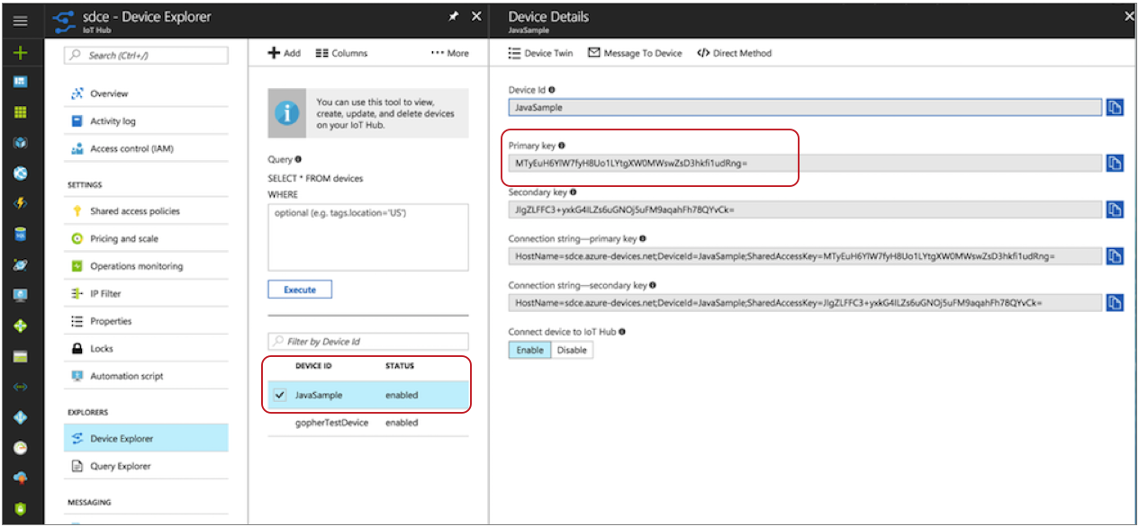
- In the Device Explorer pane, select the newly created device.
- Make a note of the device ID and the primary key. When you configure the Azure IoT
Hub Producer destination, use these values for the Device ID property and the Shared
Access Key stage property.
Data Formats
The Azure IoT Hub Producer destination writes data to Microsoft Azure IoT Hub based on the data format that you select. You can use the following data formats:
- Binary
- The destination writes binary data from a single field in the record.
- JSON
- The destination writes records as JSON data. You can use one of
the following formats:
- Array - Each file includes a single array. In the array, each element is a JSON representation of each record.
- Multiple objects - Each file includes multiple JSON objects. Each object is a JSON representation of a record.
- SDC Record
- The destination writes records in the SDC Record data format.
- Text
- The destination writes data from a single text field to the destination system. When you configure the stage, you select the field to use. When necessary, merge record data into the field earlier in the pipeline.
- You can configure the characters to use as record separators. By default, the destination uses a UNIX-style line ending (\n) to separate records.
- When a record does not contain the selected text field, you can configure the destination to report the missing field as an error or to ignore the missing field. By default, the destination reports an error.
- When configured to ignore a missing text field, you can configure the destination to discard the record or to write the record separator characters to create an empty line for the record. By default, the destination discards the record.
Configuring an Azure IoT Hub Producer Destination
Configure an Azure IoT Hub Producer destination to write data to Microsoft Azure IoT Hub. Be sure to register Data Collector as a device in your IoT hub before you configure the destination.
-
In the Properties panel, on the General tab, configure the
following properties:
General Property Description Name Stage name. Description Optional description. Required Fields 
Fields that must include data for the record to be passed into the stage. Tip: You might include fields that the stage uses.Records that do not include all required fields are processed based on the error handling configured for the pipeline.
Preconditions Conditions that must evaluate to TRUE to allow a record to enter the stage for processing. Click Add to create additional preconditions. Records that do not meet all preconditions are processed based on the error handling configured for the stage.
On Record Error Error record handling for the stage: - Discard - Discards the record.
- Send to Error - Sends the record to the pipeline for error handling.
- Stop Pipeline - Stops the pipeline.
-
On the IoT Hub tab, configure the following
properties:
IoT Hub Property Description IoT Hub Name Name of your IoT hub. Device ID 
ID for the Data Collector device registered in your IoT hub. Device IDs are case sensitive. Shared Access Key
Shared access primary key string for the Data Collector device registered in your IoT hub. Enter the primary key value for the Data Collector device created in the Azure portal. Maximum Request Time Maximum number of seconds to wait for a request to complete. -
On the Data Format tab, configure the following
property:
Data Format Property Description Data Format
Data format for messages: - Binary
- JSON
- SDC Record
- Text